
In the previous post, we explored what Agent Skills are and how they work. There, I used a very simple skill, one that simply replaced a small bit of system prompt.
But we can also create more robust skills, and even skills that can be used instead of classic agent tools. In this post, we'll do just that, and then analyze which solution works better in a skills versus tools showdown.
First, I'll demo an agent equipped with a classic tool. Then, we'll see what it takes to achieve the same goal using a skill instead.
To start, here's an agent that once again (as in the previous post) serves employees of the fictional company hAIr. Theoretically, this agent may have many tools, but in the implementation below I've equipped it with just one tool. This tool creates an invoice PDF that hAIr can send over to a client.
There's a decent amount of code below, but a lot of it is just part of the invoice-creation tool:
import osimport jsonfrom dotenv import load_dotenvfrom openai import OpenAIimport sysfrom datetime import datefrom pathlib import Pathtry: from xhtml2pdf import pisaexcept ImportError: print("Error: xhtml2pdf is required. Install it with: pip install xhtml2pdf") sys.exit(1)load_dotenv()llm = OpenAI()WIG_PRICE = 500.00def render_template(template_path: Path, invoice_number: str, client_name: str, quantity: int) -> str: """Render the HTML template with the provided data using string replacement.""" amount = quantity * WIG_PRICE html = template_path.read_text() html = html.replace("{{invoice_number}}", invoice_number) html = html.replace("{{client_name}}", client_name) html = html.replace("{{quantity}}", str(quantity)) html = html.replace("{{amount}}", f"${amount:,.2f}") html = html.replace("{{total_due}}", f"${amount:,.2f}") html = html.replace("{{invoice_date}}", date.today().strftime("%B %d, %Y")) return htmldef generate_pdf(html_content: str, output_path: str) -> bool: """Generate PDF from HTML content using xhtml2pdf.""" try: with open(output_path, "wb") as pdf_file: status = pisa.CreatePDF(html_content, dest=pdf_file) return not status.err except Exception as e: print(f"Error generating PDF: {e}") return Falsedef create_invoice(invoice_number: str, client_name: str, quantity: int, output_path: str = "invoice.pdf") -> str: """ Generate a PDF invoice for hAIr. Args: invoice_number: Unique invoice ID (e.g., "INV-2026-0042") client_name: Customer or company name quantity: Number of wigs ordered output_path: Output PDF filename (defaults to "invoice.pdf") Returns: Path to the generated PDF file, or error message if failed. """ script_dir = Path(__file__).parent template_path = script_dir / "assets/invoice_template.html" if not template_path.exists(): return f"Error: Template not found: {template_path}" html_content = render_template(template_path, invoice_number, client_name, quantity) if generate_pdf(html_content, output_path): return f"Invoice generated: {output_path}" else: return "Error: Failed to generate PDF"TOOLS = [ { "type": "function", "name": "create_invoice", "description": "Generate an invoice PDF.", "parameters": { "type": "object", "properties": { "invoice_number": { "type": "string" }, "client_name": { "type": "string" }, "quantity": { "type": "integer" }, }, "required": ["invoice_number", "client_name", "quantity"], }, }]def llm_response(history): response = llm.responses.create( model="gpt-5.2", input=history, tools=TOOLS ) return responsedef agent_loop(history): while True: # the agent loop response = llm_response(history) history += response.output tool_calls = [obj for obj in response.output if getattr(obj, "type", None) == "function_call"] text_messages = [obj for obj in response.output if getattr(obj, "type", None) == "message"] if not tool_calls: break if text_messages: print(f"\nAssistant: {response.output_text}") for tool_call in tool_calls: function_name = tool_call.name args = json.loads(tool_call.arguments) if function_name == "create_invoice": result = {"create_invoice": create_invoice(**args)} history += [{"type": "function_call_output", "call_id": tool_call.call_id, "output": json.dumps(result)}] return responsedef system_prompt(): return """You are an AI agent used by employees of the company hAIr, which produces AI-powered wigs and toupees. (Such products are obviously necessary, and are a crucial step towards reaching AGI.) You help employees with all sorts of needs. Among other things, you can generate an invoice on behalf of hAIr. To do this, use the create_invoice tool.""" assistant_message = "How can I help?"user_input = input(f"\nAssistant: {assistant_message}\n\nUser: ")history = [ {"role": "developer", "content": system_prompt()}, {"role": "assistant", "content": assistant_message}, {"role": "user", "content": user_input}]while user_input != "exit": response = agent_loop(history) print(f"\nAssistant: {response.output_text}") user_input = input("\nUser: ") history += [{"role": "user", "content": user_input}]print("****HISTORY****")print(history)Here are the essential points: The agent is equipped with a tool create_invoice that generates the PDF. The create_invoice function requires three parameters:
- An invoice number
- The client name
- The quantity of product (wigs) that is being purchased. (Each wig costs $500, so the invoice total is computed as
500 * quantity.)
The create_invoice function relies on a couple of assets - namely, an HTML template file and a logo PNG file. The function uses the xhtml2pdf library to convert the HTML template to a hAIr-branded PDF.
Here's a screenshot of one example invoice:
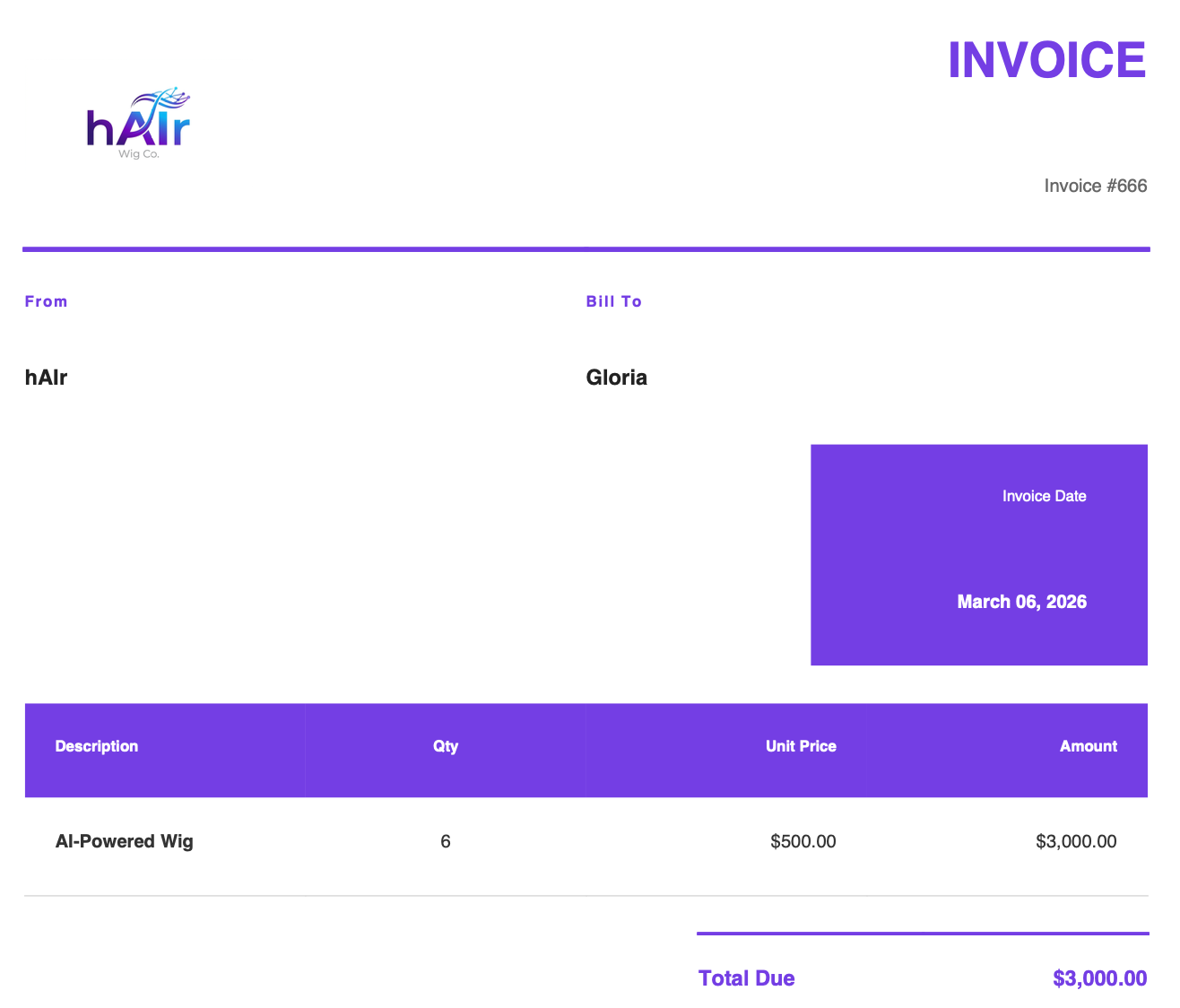
Next up, let's see how we can rebuild this app using an agent skill instead of a classic tool.
Using a Skill Instead of a Tool
To recreate our invoice-generation functionality, our skill is going to need a few things. I've called the skill invoice-generator, and have created a folder by the same name. Here are its contents:
invoice-generator/├── SKILL.md├── assets/│ ├── hair_logo.png│ └── invoice_template.html└── scripts/ └── generate_invoice.pyIn our first post about skills, we only had the SKILL.md file itself. But now we need more items to make our skill work. For one thing, we'll need the HTML invoice template and the company logo file. I've placed these files in the assets subfolder.
Additionally, we also have a scripts subfolder. In it, I placed the code that generates the invoice. This is essentially the same code that our tool used in the previous implementation.
The key difference between the tool implementation and the skill implementation is that with the tool, the LLM triggers our own code to call the tool function directly.
But with a skill, the LLM will use a shell to run this code as a script. In our case, we have one script generate_invoice.py, and the LLM will run something like python generate_invoice.py inside a shell.
For reference, here's what's inside the generate_invoice.py script file:
#!/usr/bin/env python3"""Invoice Generator for hAIr.Generates PDF invoices from command line arguments using an HTML template."""import sysfrom datetime import datefrom pathlib import Pathtry: from xhtml2pdf import pisaexcept ImportError: print("Error: xhtml2pdf is required. Install it with: pip install xhtml2pdf") sys.exit(1)WIG_PRICE = 500.00def render_template(template_path: Path, invoice_number: str, client_name: str, quantity: int) -> str: """Render the HTML template with the provided data using string replacement.""" amount = quantity * WIG_PRICE html = template_path.read_text(encoding="utf-8") html = html.replace("{{invoice_number}}", invoice_number) html = html.replace("{{client_name}}", client_name) html = html.replace("{{quantity}}", str(quantity)) html = html.replace("{{amount}}", f"${amount:,.2f}") html = html.replace("{{total_due}}", f"${amount:,.2f}") html = html.replace("{{invoice_date}}", date.today().strftime("%B %d, %Y")) return htmldef generate_pdf(html_content: str, output_path: str, base_dir: Path) -> bool: """Generate PDF from HTML content using xhtml2pdf.""" def link_callback(uri: str, rel: str) -> str: # Resolve relative asset URIs (e.g., assets/hair_logo.png) against base_dir candidate = (base_dir / uri).resolve() if candidate.exists(): return str(candidate) return uri try: with open(output_path, "wb") as pdf_file: status = pisa.CreatePDF( html_content, dest=pdf_file, link_callback=link_callback, ) return not status.err except Exception as e: print(f"Error generating PDF: {e}") return Falsedef create_invoice(invoice_number: str, client_name: str, quantity: int, output_path: str = "invoice.pdf") -> str: """Generate a PDF invoice for hAIr.""" script_dir = Path(__file__).parent base_dir = script_dir.parent # invoice-generator/ template_path = base_dir / "assets" / "invoice_template.html" if not template_path.exists(): return f"Error: Template not found: {template_path}" html_content = render_template(template_path, invoice_number, client_name, quantity) if generate_pdf(html_content, output_path, base_dir=base_dir): return f"Invoice generated: {output_path}" else: return "Error: Failed to generate PDF"def main(): if len(sys.argv) < 4: print("Usage: python generate_invoice.py <invoice_number> <client_name> <quantity> [output.pdf]") print("\nExample:") print(' python generate_invoice.py INV-2026-0042 "Glamour Studios Inc." 3') sys.exit(1) invoice_number = sys.argv[1] client_name = sys.argv[2] try: quantity = int(sys.argv[3]) except ValueError: print(f"Error: quantity must be a number, got '{sys.argv[3]}'") sys.exit(1) output_path = sys.argv[4] if len(sys.argv) > 4 else "invoice.pdf" result = create_invoice(invoice_number, client_name, quantity, output_path) print(result) if result.startswith("Error"): sys.exit(1)if __name__ == "__main__": main()The last ingredient of the agent skill is the SKILL.md file itself. Here's what I put inside it:
---name: invoice-generatordescription: Generate PDF invoices for hAIr (AI-powered wigs company). Use when the user asks to create an invoice, generate a bill, or make an invoice PDF for a client.---# hAIr Invoice GeneratorGenerate professional PDF invoices for hAIr's AI-powered wig sales.## Quick Start```bashpip install xhtml2pdf # one-time setuppython <skill_directory>/scripts/generate_invoice.py <invoice_number> <client_name> <quantity> <workspace>/invoice.pdf```**Example:**```bashpython <skill_directory>/scripts/generate_invoice.py INV-2026-0042 "Glamour Studios Inc." 3 <workspace>/invoice.pdf```## Arguments| Argument | Description ||----------|-------------|| `invoice_number` | Unique invoice ID (e.g., `INV-YYYY-NNNN`) || `client_name` | Customer or company name (quote if contains spaces) || `quantity` | Number of wigs ordered || `output_path` | Path for the output PDF - use `<workspace>/invoice.pdf` to save in the user's project root |## Automatic CalculationsThe script automatically sets:- **Invoice Date** = today's date- **Amount** = quantity × $500.00 (fixed wig price)- **Total Due** = same as amount## Workflow1. **Gather invoice details** from the user: - Client name - Number of wigs - Invoice number (or generate one)2. **Generate the PDF** (output goes to the workspace root): ```bash python <skill_directory>/scripts/generate_invoice.py INV-2026-0001 "Client Name" 5 <workspace>/invoice.pdf ```3. **Confirm output** - report the generated PDF path to the user## Files| File | Purpose ||------|---------|| `scripts/generate_invoice.py` | Main generation script || `assets/invoice_template.html` | HTML template || `assets/hair_logo.png` | Company logo |## Requirements- Python 3.x- xhtml2pdf (`pip install xhtml2pdf`)- System dependencies (for Docker): gcc, libcairo2-dev, pkg-config, python3-devAs always, the SKILL.md is similar to a system prompt in that it consists of instructions we're issuing to the LLM. In this case, we're telling it when and how to run the generate_invoice.py in a shell.
Below is our agent that is equipped with our invoice-generator, which it will run inside a local shell:
import osimport jsonfrom dotenv import load_dotenvfrom openai import OpenAIimport subprocessload_dotenv()llm = OpenAI()TOOLS = [ { "type": "shell", "environment": { "type": "local", "skills": [ { "name": "invoice-generator", "description": "Generate PDF invoices for hAIr (AI-powered wigs company). Use when the user asks to create an invoice, generate a bill, or make an invoice PDF for a client.", "path": "./", }, ], }, }]class CmdResult: def __init__(self, stdout, stderr, returncode, timed_out): self.stdout = stdout self.stderr = stderr self.returncode = returncode self.timed_out = timed_outclass ShellExecutor: def __init__(self, default_timeout: float = 60): self.default_timeout = default_timeout def run(self, cmd: str, timeout: float | None = None) -> CmdResult: t = timeout or self.default_timeout p = subprocess.Popen( cmd, shell=True, stdout=subprocess.PIPE, stderr=subprocess.PIPE, text=True, ) try: out, err = p.communicate(timeout=t) return CmdResult(out, err, p.returncode, False) except subprocess.TimeoutExpired: p.kill() out, err = p.communicate() return CmdResult(out, err, p.returncode, True)def llm_response(history): response = llm.responses.create( model="gpt-5.2", input=history, tools=TOOLS ) return responsedef agent_loop(history): while True: response = llm_response(history) history += response.output tool_calls = [obj for obj in response.output if getattr(obj, "type", None) == "function_call"] shell_calls = [obj for obj in response.output if getattr(obj, "type", None) == "shell_call"] if not (tool_calls or shell_calls): break # for tool_call in tool_calls: # placeholder for shell_call in shell_calls: shell_script = "\n".join(shell_call.action.commands) executor = ShellExecutor() result = executor.run(shell_script) history += [{"type": "local_shell_call_output", "call_id": shell_call.call_id, "output": json.dumps(result.__dict__)}] return responsedef system_prompt(): return """You are an AI agent used by employees of the company hAIr, which produces AI-powered wigs and toupees. (Such products are obviously necessary, and are a crucial step towards reaching AGI.) You help employees with all sorts of needs."""assistant_message = "How can I help?"user_input = input(f"\nAssistant: {assistant_message}\n\nUser: ")history = [ {"role": "developer", "content": system_prompt()}, {"role": "assistant", "content": assistant_message}, {"role": "user", "content": user_input}]while user_input != "exit": response = agent_loop(history) print(f"\nAssistant: {response.output_text}") user_input = input("\nUser: ") history += [{"role": "user", "content": user_input}]print("****HISTORY****")print(history)When I prompt this agent to create an invoice #666 for client "Gloria" and quantity of 6, here's what happened. The agent first ran this series of commands in the local shell:
python -Vpython invoice-generator/scripts/generate_invoice.py 666 "Gloria" 6 ./invoice.pdfls -la ./invoice.pdfBecause the critical library xhtml2pdf was not yet installed, the following output was returned to the shell after attempting to run the generate_invoice.py script:
Error: xhtml2pdf is required. Install it with: pip install xhtml2pdfBecause of this, the agent went ahead and issued a new set of shell commands:
pip -q install xhtml2pdfpython invoice-generator/scripts/generate_invoice.py 666 "Gloria" 6 ./invoice.pdfls -la ./invoice.pdfThis time, the shell outputted:
Invoice generated: ./invoice.pdfAnd so, the agent knew that its work was complete, and informed me as such.
Bottom Line: Tools Vs. Skills
So, both implementations of the invoice-generating agent worked. The question, though, is whether one approach is better than the other.
In my opinion, the thing to look at here is which approach is more deterministic. In both implementations, there certainly are things the agent can get wrong. However, there are more things that an LLM can mess up when it comes to skills than it can with classic tools.
With classic tools, an agent might neglect to call the right tool, or it might call the right tool with the wrong parameters. But assuming a tool is called correctly, the rest of the process follows deterministically - as the tool function itself is classic deterministic code.
At first glance, skills seem similar. Assuming they run a given script in the shell properly, the script itself is also deterministic code. But here's the thing: we've given the agent a shell and the autonomy to do whatever it wants with it. The agent can run our script, but it could also run other unexpected commands as well.
One early time I ran the skill-equipped agent, the agent initially struggled to produce the invoice. In truth, this wasn't the agent's fault. There was an instruction in the SKILL.md file that was incorrect. However, the agent then proceeded to edit the SKILL.md file before successfully generating the invoice! I wouldn't have even known that this happened had I not inspected the conversation history logs.
In this case, the agent happened to do something good, but it nonetheless demonstrates how shell-equipped agents can do unexpected things.
Another pitfall of skills is that we may instruct the agent in natural language as to what commands it should execute. It's easy for these instructions to be vague and the agent to not end up doing what we want.
For example, in the "Workflow" section of SKILL.md, we tell the agent to **Confirm output** - report the generated PDF path to the user. We haven't given the agent the specifics of how to confirm this output. The agent reasonably ran the command ls -la ./invoice.pdf to check whether the invoice file exists.
But is this the right approach? What if an invoice.pdf file already exists from a previous agent run, and the script fails silently this time around? The agent will likely miss this and erroneously conclude that the invoice was generated successfully.
Yes, we could devise a better approach for confirmation and place such instructions in SKILL.md. However, the point is that we're using natural language to describe an algorithm, and natural language can be open to interpretation. As such, it's nondeterministic as to what commands an agent may decide to execute.
This issue evaporates with classic agent tools, as once the tool is called correctly, the entire process that follows is dictated by regular deterministic code.
It emerges that classic tools are more reliable than agent skills. I've identified two reasons why this is so:
- With skills, an agent can perform unexpected commands in the shell.
- With skills, we often use natural language to describe an algorithm, and an agent may not run the code we hoped it might.
So, if you can get the job done with a tool, use a tool.
So where do agent skills shine? Skills are helpful where you need your agent to flexibly perform a variety of related tasks, and you want to provide guidance on how these tasks should be carried out. We'll explore this in a future post.