Agentic Loops and Design Patterns
It's easy to set up an LLM-powered agent, but building one that's effective in production involves careful thought and nuance. We'll start with agentic core concepts and how to construct an agent loop. We'll then discuss common agentic challenges and their causes. From there, we'll explore design patterns that help an agent get around these challenges.
1. Tools
The thing that sets an agent apart from a chatbot is an agent's ability to invoke a tool (a technique also known as function calling). Inherently, LLMs only generate text, and cannot perform actions, such as searching the web or writing to a file. But LLM-powered agents can perform such actions. The way this works is with a clever hack, as demonstrated by the following simple example:
Say that we want our agent to be capable of sending emails. An LLM can easily generate the text of the email, but can't actually send it. However, if we have a code function called send_email which does send an email, we can get an LLM to indirectly trigger the send_email function through the text it generates.
Say that our send_email function has three arguments, one for the recipient email address, another for the subject line, and a third for the email body. We can put the following instructions in the LLM's system prompt:
"""You are a friendly AI assistant. In addition to your ability to converse with the user, you are equipped with the ability to send an email if the user so desires. Here's how to send an email. You first need to ensure that you have three pieces of information: 1) The recipient email address 2) The email subject 3) The email body Then, when you're ready to send the email, output the following precise syntax of double braces and single pipes: [[recipient email address|email subject|email body]] For example, if the user wants to email the message "Hey, what's up?" to bob@example.net with the subject "Hi", output: [[bob@example.net|Hi|Hey what's up?]]"""When the user provides the details of the email, the LLM will output something like [[bob@example.net|Hi|Hey what's up?]]. This double-brace notation is completely arbitrary, as I made it up off the top of my head. Yet, the LLM will generate this notation since we instructed it to do so.
While the output of this notation doesn't send an email on its own, we can write code that uses this very text generation to send an email. Specifically, we'd have a code function that uses regex to inspect the LLM output for this kind of format:
def extract_double_brace(text: str) -> Optional[Tuple[str, str, str]]: """ Extracts three pieces of text inside [[...]] separated by '|'. Returns a tuple (part1, part2, part3) or None if no match. """ match = re.search(r"\[\[(.*?)\]\]", text) if not match: return None parts = match.group(1).split("|") return tuple(parts)Armed with this function, on every turn in which an LLM outputs text, we'd inspect that text for the special "double brace" notation. If we find it, we then call the send_email function with the necessary parameters:
email_data = extract_double_brace(response.output_text) # response.output_text is the LLM's text outputif email_data: # if tool is called send_email(recipient=email_data[0], subject=email_data[1], body=email_data[2])So while an LLM can only generate text, the LLM still indirectly triggers the sending of the email. The LLM outputs special text indicating that the email should be sent, as well as the email details. From there, our code handles the rest.
The ability of an LLM to trigger an arbitrary code function means that an LLM can do anything that code can do. And that's what makes agents so powerful.
In practice, LLM APIs provide a more streamlined way to allow the LLM to use tools, and we don't have to instruct the LLM to generate special notation like the made-up double brace syntax. We'll explore this standard approach next, but it's important to understand that the underlying mechanism is the same: An LLM uses a tool by generating special text, and some code reads that text and proceeds to trigger some other code.
The standard way to equip an LLM with tools is to send a tool schema together with the prompt. This tool schema (typically a JSON object) describes all the tools available to be invoked. For our send_email tool, the schema may look like this:
tools = [ { "type": "function", "name": "send_email", "description": "Send an email containing a specific subject and body to a specific recipient.", "parameters": { "type": "object", "properties": { "recipient_email": { "type": "string" }, "subject": { "type": "string" }, "body": { "type": "string" }, }, "required": ["recipient_email", "subject", "body"], }, }]The "description" describes the tool in plain English, and the "parameters" spell out the function arguments and data types, plus which arguments are required.
When we prompt the LLM, we pass this tool schema along as well, which under the hood gets included in the prompt itself. The LLM is thus informed about how the send_email function is supposed to work. As to the send_email function itself, that's still a regular Python function that we need to supply ourselves.
Without a tool schema, an LLM will just generate text objects, text wrapped together with some metadata. (This text is that which you'd display to a user interacting with a chatbot.) But once we pass a tool schema to the LLM, the model may now also output tool call objects.
Let's see this in action with the OpenAI SDK. We'll ask GPT-5.6 Luna to send an email:
response = llm.responses.create( model="gpt-5.6-luna", input="Send an email to pia@example.com with the subject 'Hi' and the body 'please call me'", tools=tools # passing in the tool schema from above)The response we get is a ResponseFunctionToolCall object looking something like this:
ResponseFunctionToolCall(type='function_call', name='send_email', arguments='{"recipient_email":"pia@example.com", "subject":"Hi", "body":"please call me"}')This is effectively the special “notation” indicating that the LLM wants to call the send_email tool. Since the LLM can't call a code function itself, we have to intervene with our own code that actually calls the appropriate function with the correct arguments:
for item in response.output: if item.type == "function_call": function_name = item.name args = json.loads(item.arguments) if function_name == "send_email": result = {"send_email": send_email(**args)} # we call the send_email function hereAn LLM equipped with tools is already a powerful creature. The next step is to allow the LLM to perform complex and long-running tasks that may involve multiple tool calls called in succession. To make this happen, we need an agent loop, which is what we’ll explore next.
2. The Anatomy of an Agent Loop
Say we want to equip our agent with the capability of searching the web. Web search takes two steps: First, we perform a search query (such as "AI engineering news") and retrieve a list of relevant URLs. Second, we access a URL and scrape the contents of that web page.
So, we might have a search_web tool that retrieves URLs, and a read_webpage tool that scrapes the content of a given URL. If we want our agent to research the latest AI engineering news, to even read a single web page the agent will need to make successive tool calls, that is, search_web followed by read_webpage.
Enter the agent loop. An agent loop runs as long as the LLM has outputted a tool call on its most recent turn. At a minimum, we perform the following steps within the loop:
- We send the entire conversation history and tool schema to the LLM. If there are no tool calls, the loop terminates. However, if there's a tool call...
- We append the tool call to the conversation history.
- We call the appropriate tool (a regular code function).
- We capture the results of the tool function, and append them to the conversation history. From here, we go back to Step #1.
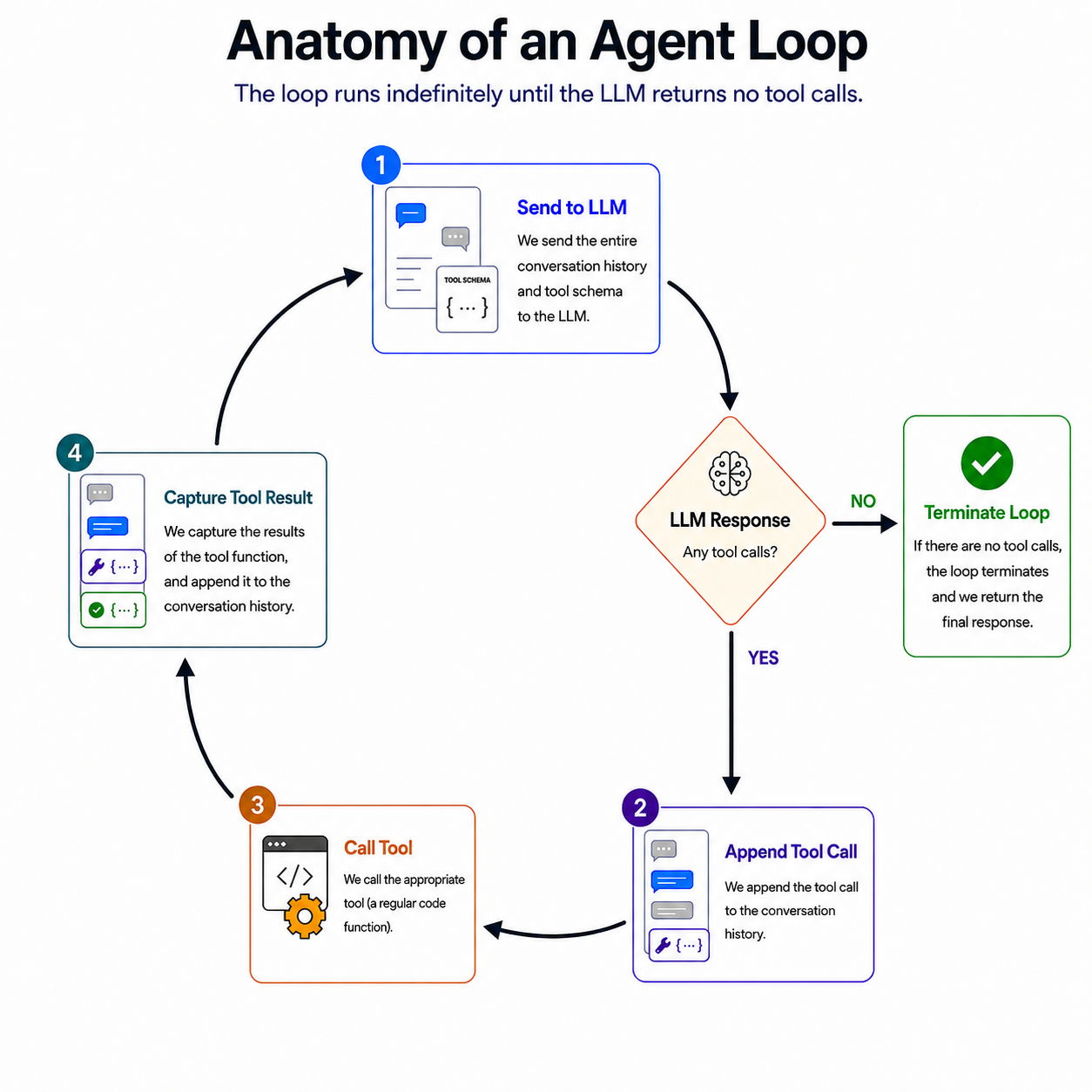
Because LLMs are stateless, we keep appending info to the conversation history, and then send the entire history to the LLM as the next prompt.
The agent loop is what allows our agent to call tool after tool until it gets the job done. If we asked our agent to research the latest news in AI engineering, it might first use the search_web tool to query "AI engineering news." This tool returns a list of relevant URLs. On the next round of the loop, the prompt includes these URLs, and so the LLM will next call read_webpage on at least one of those URLs.
The loop is complete when the LLM does not output a tool call on the latest turn. This means that the LLM only outputted text. In our example, this text will be a research summary about the latest in AI engineering. For an agent that sends emails, the final text might be a simple confirmation that the task was completed successfully.
It's worth paying special attention to the step in which we append the tool results to the conversation history. Obviously, if we didn't inform the LLM of the URLs retrieved by the search_web tool, it couldn't proceed to read each URL. But even for a tool like send_email, which is focused on performing an action rather than returning data, we need to inform the LLM as to whether the tool was successful.
For this, we need our send_email tool to provide a return value that clearly indicates success or failure. For success, we might return a string like, "Email sent" so that this gets appended to the conversation history and the LLM is informed about the success on the next round of the loop.
In the case of tool failure, there's great advantage to having the tool return as much detail about the failure as possible. Besides informing the LLM that the tool failed, this information might allow the agent to retry the tool in another way. For example, if the tool returns an exception that makes it clear that the tool was called with incorrect arguments, the agent can learn from that and retry the tool while correcting its mistake.
One other general point to make about agent loops is that while the default termination point is when the agent stops outputting tool calls, you can also add other termination conditions. That is, you'd include methods of verifying that the agent's work is "done" and there's no need for the agent to continue working. For example, you may opt to terminate the loop when a particular set of unit tests pass. Or, the agent may stop after a certain number of turns to wait for human approval.
3. Diving Deeper: Agent Loop Details
Sometimes, an agent may not output a single tool call, but an array containing multiple tool calls. When an agent does this, the intention is that these tools can be run in parallel.
For example, a research agent may first call search_web to find web articles related to a particular query. After this tool retrieves, say, five URLs, the agent may output in its next turn an array containing five read_webpage tool calls:
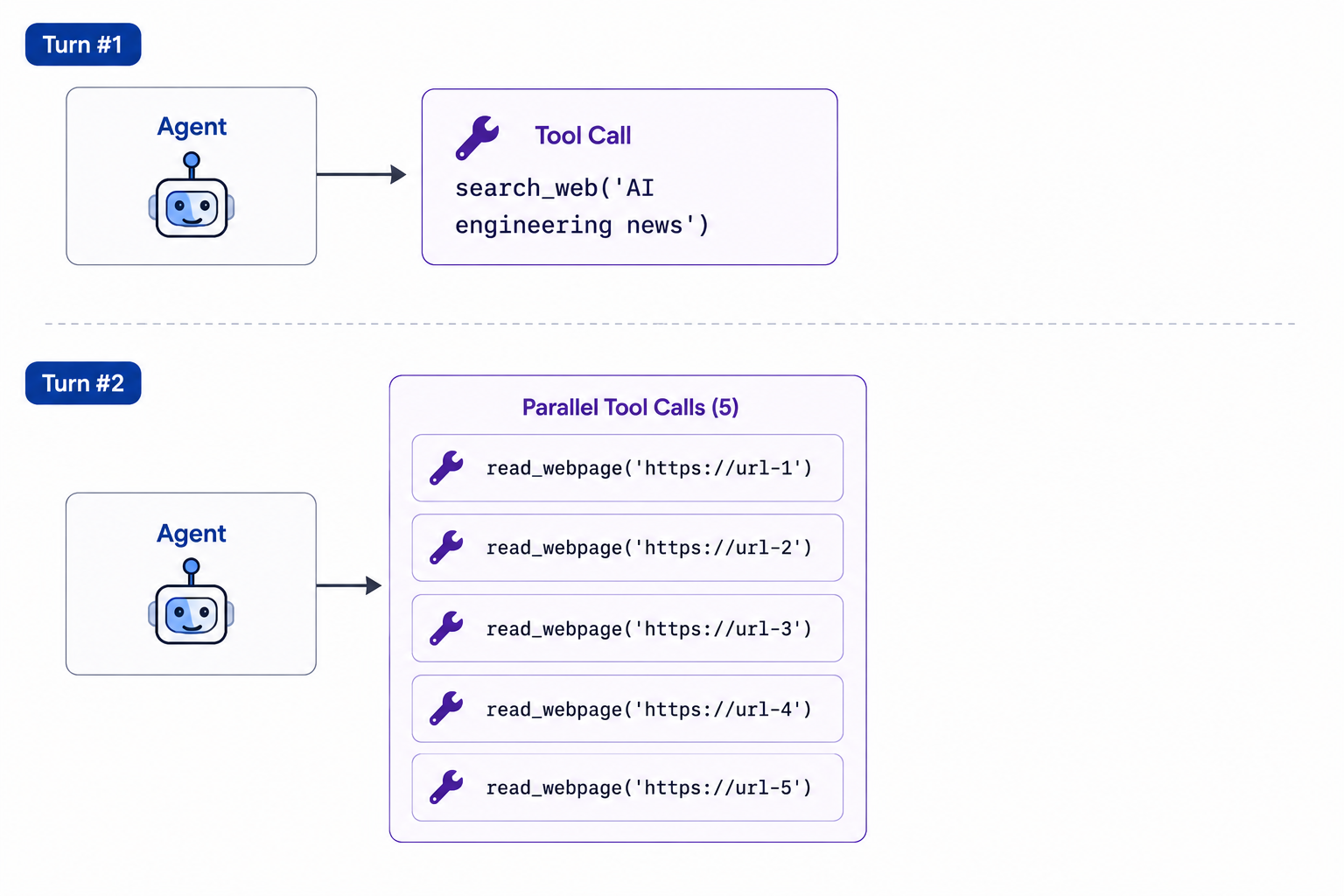
There's no reason why we should scrape one URL at a time. With parallel programming, we can save time by scraping all five web pages simultaneously.
It's up to us to write the code that processes the tool calls in parallel - and we can alternatively choose to process them iteratively instead. But the point is that when an agent outputs multiple tool calls in a single turn, the intention is that these tools logically could be run in parallel.
Relatedly, an agent may sometimes in a single turn output both tool calls and text. When this is the case, the text is often an update about what the agent is currently doing or a plan of what it intends to do next. It's up to you whether you want to display this text to the user. It can be a good way of informing the user of the agent's progress, but it can also be a bit much if the user only wants to see the final results. This all depends on the nature of your app.
Many of the latest LLMs are specially trained reasoning models, which generate extra text before outputting an “official” response. This extra text - known as reasoning tokens - is designed to help the LLM break down a complex task into smaller pieces that can be more easily solved. For example, the reasoning tokens might consist of a step-by-step plan the LLM generates before rushing headlong into calling tools. Generating such a plan gives the agent a better shot at completing the task correctly.
Reasoning is an important lever when it comes to agents, but it needs to be wielded wisely. Models like OpenAI's GPT 5.6 Sol and Anthropic's Claude Opus 4.8, both of which are reasoning models, allow you to set the reasoning "effort" level to values like "low", "medium", or "high". (You can also turn reasoning off altogether.) The higher the effort, the more reasoning tokens will be generated.
This presents a tradeoff: Greater effort may solve more complex tasks, but is both slower and more expensive. Reasoning tokens are text like any other text that an LLM generates, which costs money and takes time. If your agent is designed to solve relatively simple tasks, a lower effort might be good enough to get the job done while staying efficient. It can be hard to know offhand as to whether your task is "simple" or "complex" - and that's why it's important to test drive your agent at different effort levels to determine which level is truly needed.
Additionally, an agent can sometimes "overthink" a simple problem if the effort level is higher than what the task complexity calls for. For instance, even when a problem has one simple solution, high-effort reasoning can produce lines of thought that consider the problem from all different angles. And once these competing solutions have been articulated in the reasoning tokens, the agent may proceed to follow one of the wrong solutions.
Another tricky element of reasoning is its black-box nature for certain models. For the aforementioned OpenAI and Anthropic models, even as the developer, you cannot access or see the reasoning tokens. This can make debugging an errant agent harder, as you're missing data that was part of the agent's thought process. This problem is eased somewhat by the fact that these models do offer summaries of the agent reasoning, so you can get a certain window into what the reasoning tokens were. However, you can't truly see the exact reasoning tokens the agent generated, and you have to hope that the summaries are accurate. (The summaries are themselves generated by some LLM after the fact.)
By contrast, there are other models out there - especially open weight models - which do provide access to the reasoning tokens. With LLMs like Kimi K3 and Deepseek V4, you can obtain the reasoning and even display it to the user if that makes sense for your app.
One other important technique necessary for agent loops is the intermittent compaction of the conversation history. Since the prompt to the LLM is the conversation history, something that keeps growing without end, the prompt will eventually be too large for the LLM’s context window. To combat this, we need to compact the conversation history every so often, such as on every tenth turn, or when the conversation history reaches a certain length.
The simplest way to compact history is to have an LLM summarize it. There are also more subtle techniques that can be used in conjunction with this, such as eliminating certain metadata or old tool call results that really aren’t necessary for the continuation of the conversation.
4. Dealing With Agent Failures
Agents can fail in many different (and sometimes spectacular) ways. They may neglect to call a tool when they should, or call a tool when they shouldn't. They might call a tool that doesn't exist, or the wrong tool, or the right tool with the wrong arguments. They might ignore or misunderstand tool output. They might run way too long for what's necessary. Or, they may simply execute a misguided or suboptimal strategy for achieving the desired goal.
That's the bad news. The good news is that there are techniques that can help reduce the risk of agentic failure. We'll focus on these for the rest of this post.
Many of these techniques fall into two broad categories, reducing nondeterminism and reducing instruction dilution. Let's explore these two key ideas, starting with reducing nondeterminism.
One critical factor that drives agentic failure is the nondeterministic nature of an LLM. There's no sure way to predict what an LLM might output, and it won't always generate the most optimal tokens.
Yet, there may be components of an agentic system where we can reduce nondeterminism.
Let's take a customer support agent of a software company that helps users with their account, including their personal data and past purchases. One approach we can take is to equip the agent with an execute_query tool that accepts a string of SQL code as a parameter, and the tool executes the query against the database. This affords the agent a lot of flexibility, as it can look up and update anything it wants to.
But with this flexibility comes great risk. The agent could delete an entire database table with a simple query. (I've seen it happen!) As much as we might yell at the agent in the system prompt to not do this type of thing, the fact is that it could still happen.
Crafting tools wisely is one area where we can reduce nondeterminism. Instead of giving the agent a tool that allows it to do anything, we can instead equip it with what I call precise tools that do well-defined things. For the customer-support agent, we might provide a tool for each piece of functionality we want to enable it with, such as a tool that retrieves customer profile information, and a separate tool that updates a user's email address.
Here's the analogy that always comes to my mind: Instead of handing the agent a hammer directly, which it can use in both constructive and destructive ways, we give the agent a button it can push, which is wired to a hammer that is programmed to swing in precisely the right way.
With precise tools, we've reduced nondeterminism in two ways: First, we've eliminated some of the possible actions an agent can take. Also, we've taken some of the work away from the agent and moved it to a deterministic tool. With an update-user-email tool, for example, the agent no longer has to write its own SQL query (which it can mess up). The tool is a regular code function that can have the correct SQL baked right into it.
(Another popular approach for creating safe tools is to include a human-in-the-loop. A coding agent's tool that allows it to write to the shell is one example of this. The tool can be written in such a way that the shell command will not execute until the user's approval is first given.)
We'll get to other examples of reducing nondeterminism soon, but let's turn to the other piece of making an agent more reliable, which is reducing instruction dilution.
The key principle here is that an agent that is a jack of all trades is a master of none. The more tools you equip an agent with, and the more instructions you include in the system prompt, the less likely it is that an agent will use tools and adhere to instructions accurately. I call this instruction dilution, meaning that the more instructions we add, the less attention each instruction is given by the LLM.
Although LLMs are always getting more powerful and can handle increasingly larger contexts well, there's inevitably some point at which we've given the LLM too much context.
A simple way to reduce instruction dilution is to only equip the agent with tools that it actually needs. If an agent won't ever have to use that nifty PDF-generator tool, don't include it in the tool schema. (Having fewer tools also means that your prompt will have fewer input tokens, saving you time and money.)
Another way to reduce instruction dilution is with agent skills. Agent skills are instructions that we don't include in the agent's system prompt at the outset; they're deferred and only get loaded as needed.
For example, say we have a style guide on how the agent should write marketing copy. Although we can cram these instructions into the system prompt, these instructions dilute all the other instructions we've given the agent. With an agent skill, we instead give the agent a brief description of the skills it has at its disposal (kind of like the tool schema), and the agent will load a particular skill when needed. A marketing-copy skill will itself contain all the instructions of the style guide.
When a user asks the agent to craft a marketing email, the agent will load the marketing-copy skill and read the style guide. This is akin to an agent calling a tool and getting an output, so we include the skill output in the conversation history for the agent to read on the next round of the agent loop.
In this way, agent skills effectively reduce instruction dilution. If a user never asks the agent to write marketing copy, the marketing style guide never gets included in the conversation history and therefore can't dilute any other instructions or information.
Bear in mind that giving your agent too many skills will itself dilute the agent's context; it's similar to giving the agent too many tools. Skills certainly aren't foolproof, as an agent may neglect to load a skill at the appropriate time.
The more complex your agent is and the greater variety of things it needs to do, the harder it is to manage nondeterminism and instruction dilution. Let's look at some more sophisticated approaches for reining in agentic failures.
5. Multi-Agent Design Patterns
One effective solution for reducing instruction dilution is through a multi-agent system. Your agentic app may have to perform a variety of functions. But instead of giving a single agent all the instructions for all these functions, you instead have one agent that handles Function A, another that executes Function B, and a third that manages Function C. Each individual agent is given a specialized system prompt, tools, and skills. (They may also use different LLMs under the hood.) Through this, each agent becomes a "master of its craft," and when the agents work together, your app as a whole can fulfill complex tasks.
There are many different scenarios and possible configurations of multi-agent systems. Here are some of the common design patterns I've encountered:
Routing. Let's return to our example of a software company's customer-facing agent, which helps manage user accounts. Say that we also want the agent to help troubleshoot users' problems with the company's software. This will require a RAG pipeline that allows the agent to look up software documentation and the like. Instead of having a single agent manage the function of account management and the function of troubleshooting, we can build out a dedicated agent for each function.
In addition, we'd have a third agent that does intake, and routes the user's request to the appropriate agent. When a customer begins conversing with the chatbot on the company's website, the underlying agent is the intake agent. As soon as the intake agent recognizes whether the user's issue is one of account management or troubleshooting, it activates the correct agent which then takes over the conversation:
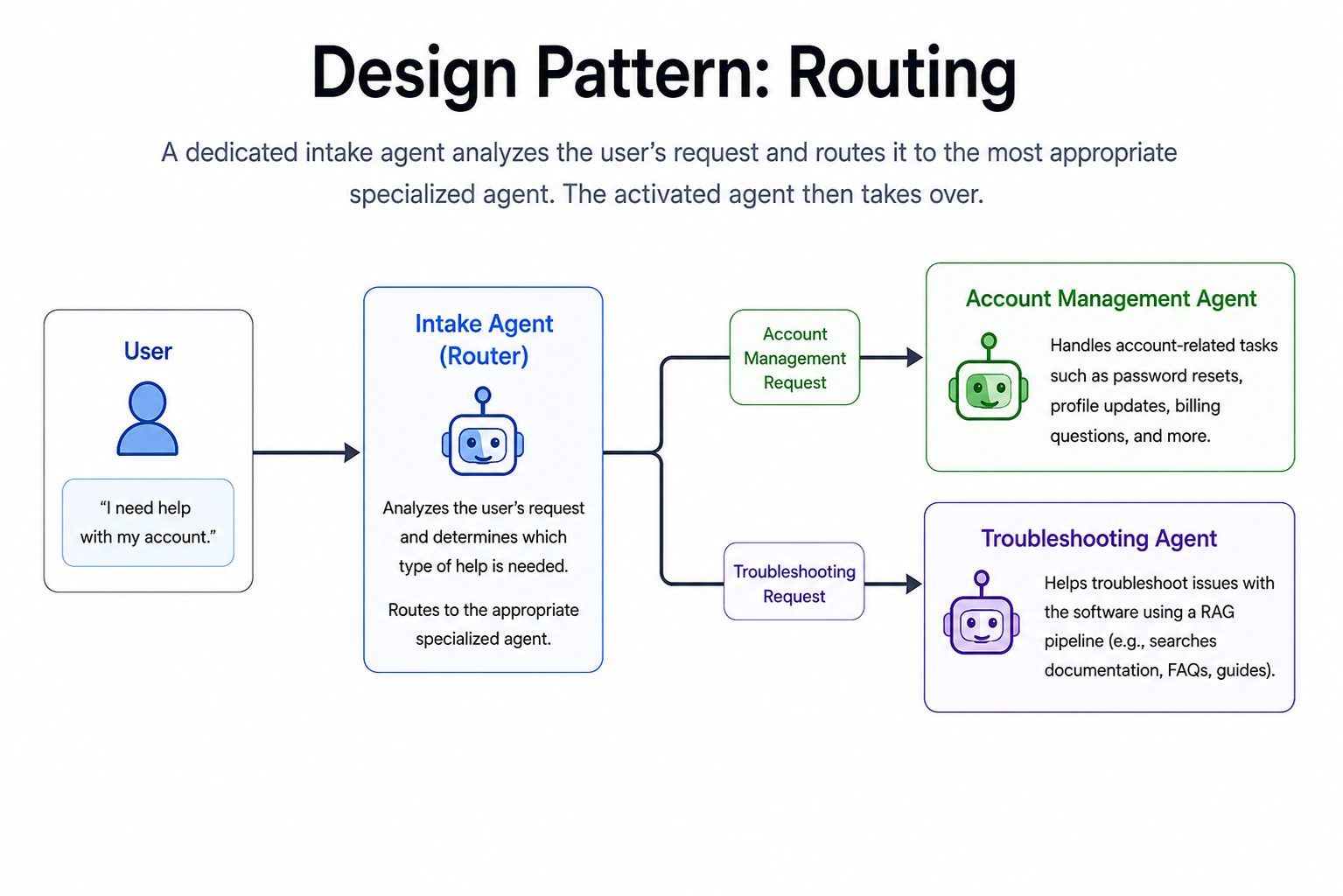
The user does not need to know that multiple agents are at work here. From the user's perspective, they're chatting with the same "agent" during the entire conversation. Indeed, the user is conversing with one agentic system, but under the hood we're employing multiple agent loops, each with their own specialized instructions.
One way to implement routing is to include a "routing tool" in the tool schema. This doesn't have to be a real function. When your code catches the routing tool call, it proceeds to quit the function running the current intake agent loop and calls whichever function runs the appropriate agent loop we want to route to.
Handoff. This pattern is a variant of routing. Continuing with our above example, say that the user is chatting with the account-management agent, but now switches gears and asks a question that requires troubleshooting. Now what? The active agent doesn't have troubleshooting capabilities.
The handoff pattern allows one agent to hand off the current conversation to another agent. When the account-management agent recognizes that another agent is better suited for the new direction of conversation, it passes along the conversation history (excluding the system prompt) to the appropriate agent:
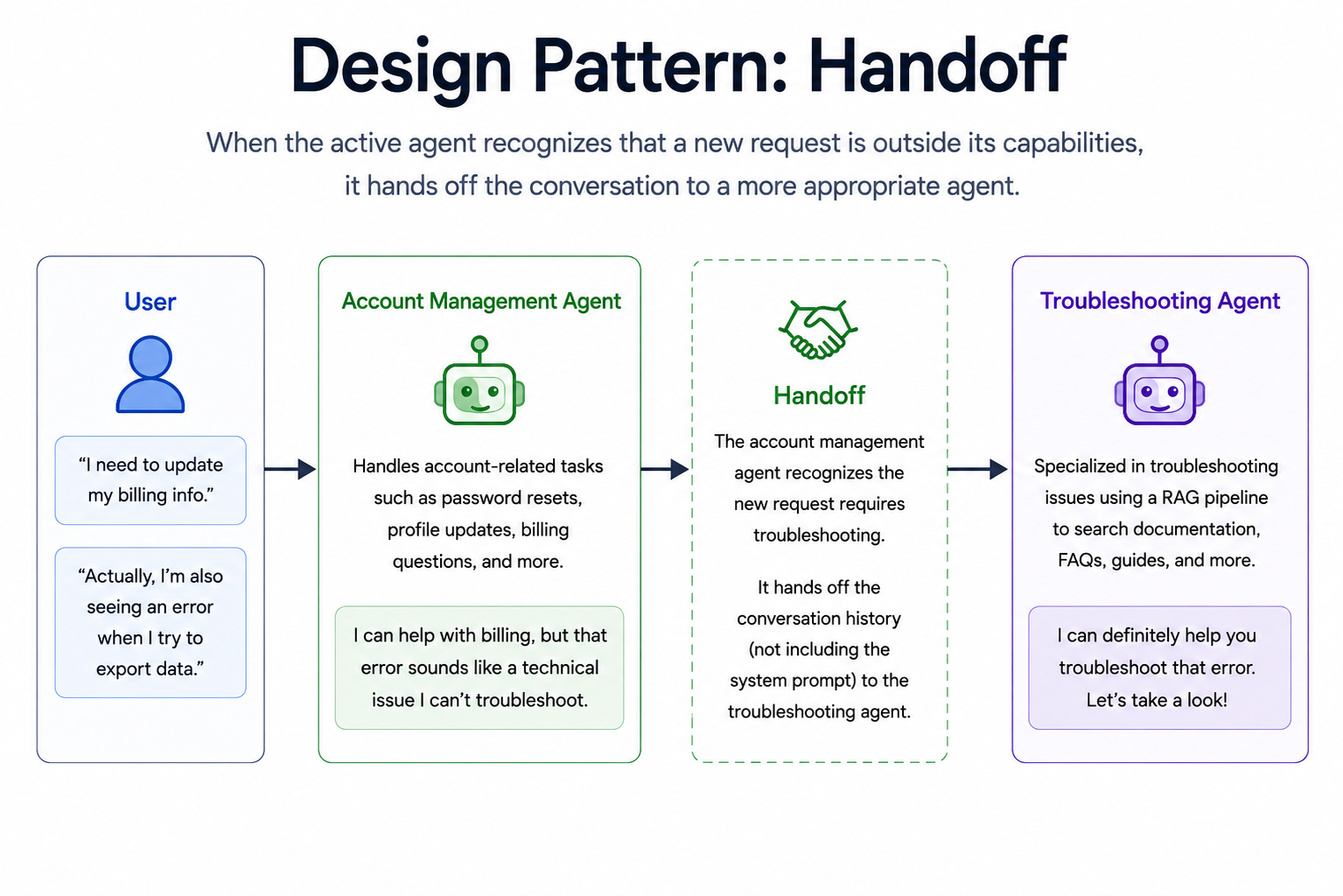
Once again, the user doesn't need to be aware that handoff is taking place.
Handoff can be implemented in conjunction with routing. A router agent can kick off the conversation, pass the baton to the appropriate agent, and then the various agents can hand off the conversation to each other when appropriate.
Delegation. We might choose to configure our customer-support agent system differently. Say that the vast majority of users converse with our chatbot about troubleshooting issues, and there's only an occasional request related to account management.
Instead of routing/handoff, we can decide that the troubleshooting agent will always converse with the user. For a one-off task like updating a billing address or looking up a past order, the troubleshooting agent will delegate the task to the account-management agent. This can be done by giving the troubleshooting agent a tool that prompts the account-management agent with a request (e.g. “please look up the current user’s past orders”). The account-management agent does its work and returns its result back to the troubleshooting agent:
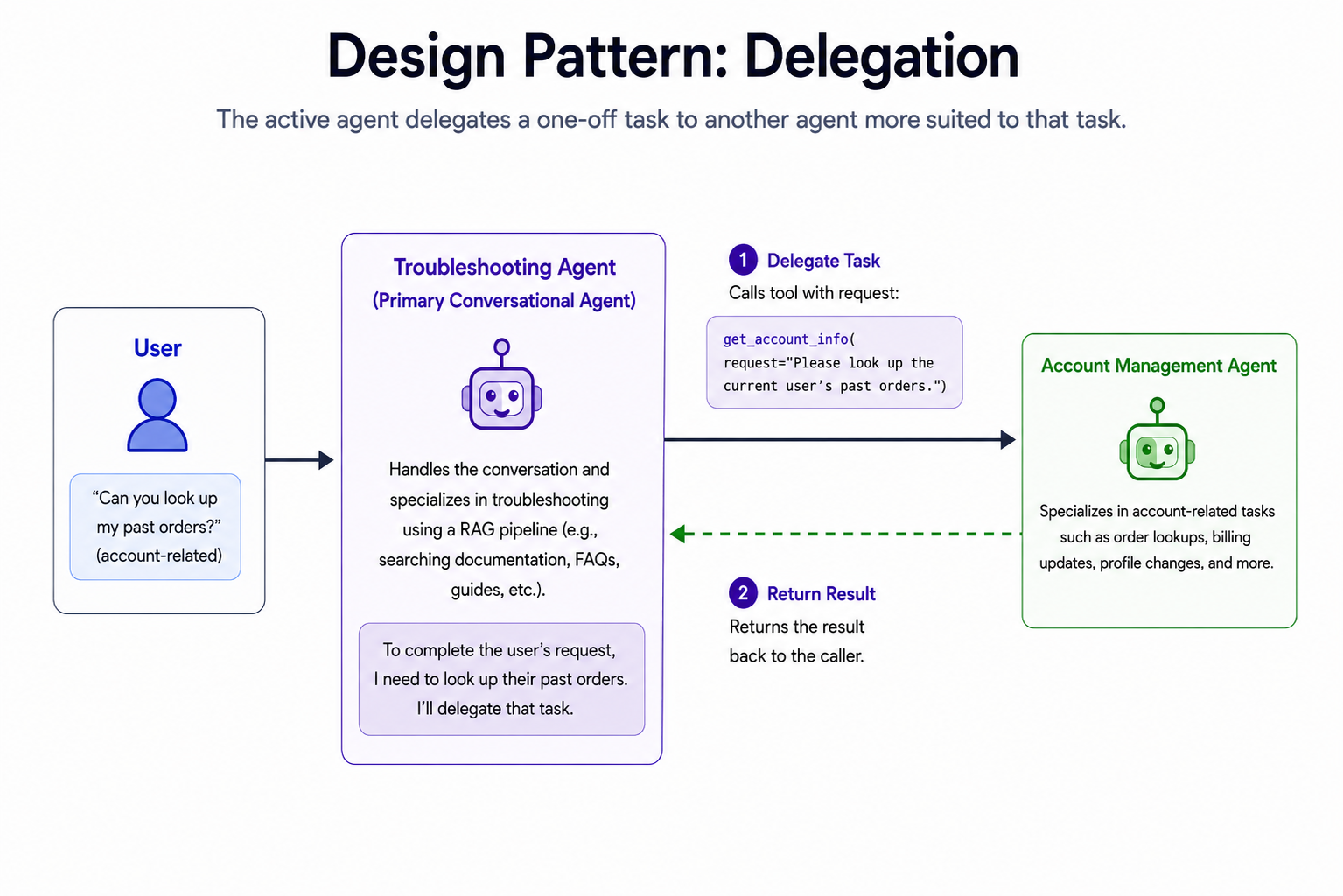
Delegation can be used either for making a change to the world (e.g. "update the user's billing address") or for retrieving information (e.g. "please look up the user's past orders"). The latter pattern can also be called consultation.
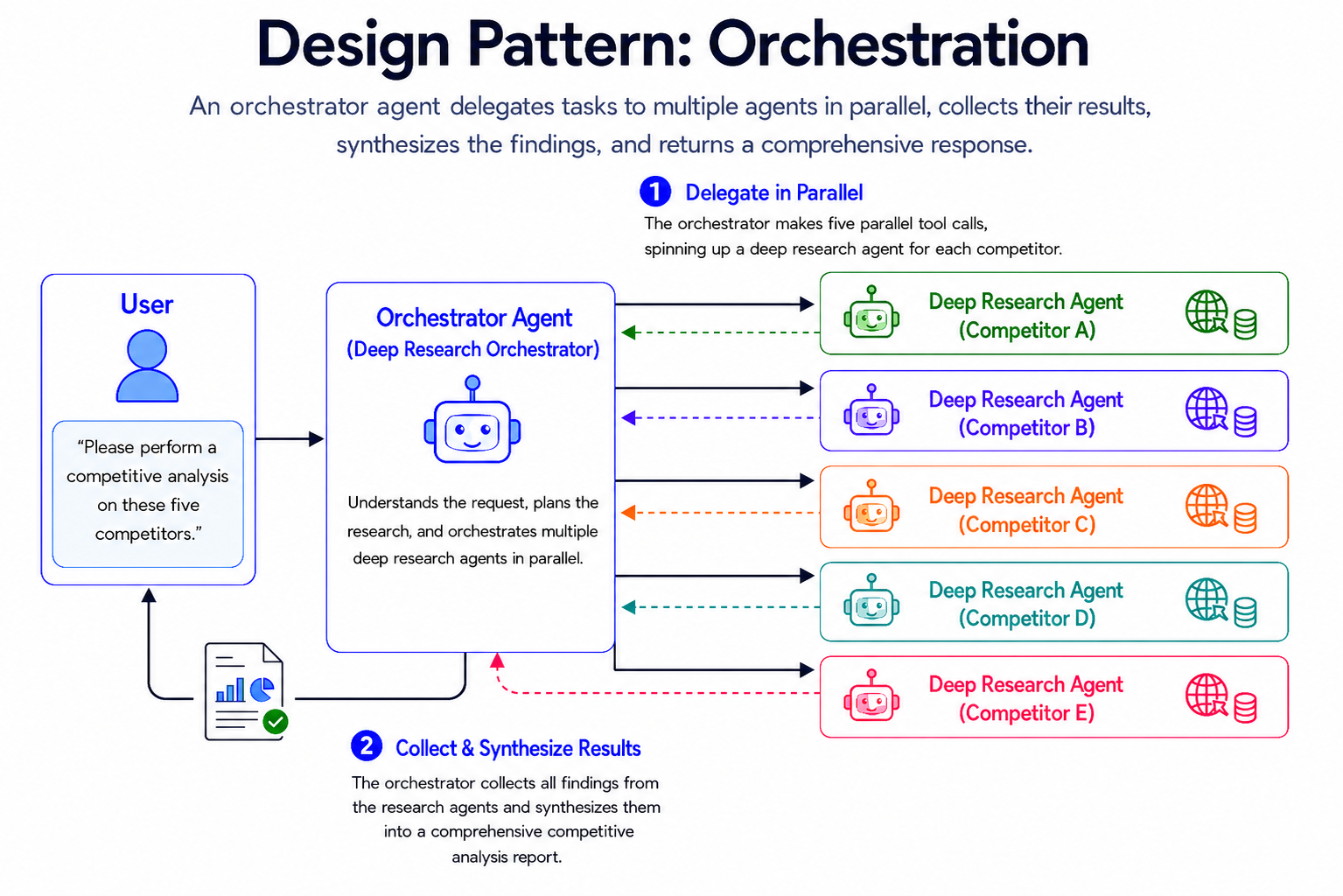
Orchestration. This is a variant of delegation in which one agent delegates tasks to multiple agents in parallel. This is a pattern common to research agents.
Say we want an agent to perform a competitive analysis on five different competitors. A deep research agent is equipped with tools that search and scrape the web, and based on the results, may do further web research to dig deeper.
It can take a while to research a single competitor thoroughly, let alone five. To save time, we can spin up five research agents, one for each competitor, and have them do their research in parallel.
To set this up, we'll have the user converse with an orchestrator agent. This agent will then make five parallel tool calls, each of which spins up a deep research agent for one of the competitors. These deep research agents themselves run in parallel, passing their findings back to the orchestrator. The orchestrator then synthesizes the results and conveys a complete report of the competitive landscape back to the user:
While these are some of the more common multi-agent patterns, there's no limit to the number of ways you can configure a multi-agent system. Of course, if a single agent can perform a job well, there's no need to build more complex systems like these. But if you're finding that your agent has to do too many varied tasks, and isn't doing some of them well, this is where building a system of various specialized agents can help.
6. Agentic Workflows
While multi-agent systems help with the problem of instruction dilution, we still have to watch out for nondeterminism. A specialized agent with a small set of well-defined instructions and tools may have a great chance of performing well, but failure is still a possibility.
As long as an agent is powered by an LLM, we can't avoid nondeterminism completely. But an agentic app doesn't have to be 100% reliant on LLMs. A key technique in building agents is to have some of the work be done by deterministic code functions. This technique becomes even more powerful when it comes to tasks that are hard for LLMs. If we can accomplish such tasks with regular code instead, we'll reduce or eliminate failure from those parts of our app.
Here's an example from a news-podcasting app I've worked on. A user of this app chats with an agent and submits a topic they're interested in hearing news about (e.g. "the latest news in Iceland"). The agent then researches the web and finally produces a 5 to 7 minute podcast (as an mp3) of a newscaster discussing the latest news on the chosen topic.
Our first approach was to set up a standard agent loop, and equip the agent with three tools:
search_web: runs a search query against the web, retrieving URLs relevant to that query.
read_webpage: scrapes the text of the web page at a given URL.
create_audio: converts a string of text into an mp3 file featuring a voice reading that text. (We used an OpenAI text-to-speech model for this.)
We gave the agent a system prompt that laid out a plan for what types of queries to use to perform web search and which types of websites to read. We also instructed it to keep gathering research until there's enough material for a 5-7 minute podcast. We described the type of podcast transcript it should write and instructed it to use the create_audio tool to convert the transcript into an mp3, the final product.
We noticed that the agent, despite our clear instructions, would choose some strange search queries when using the search_web tool. For instance, when a user asked for Iceland news, the agent used the query, "Iceland latest news June 2026 government Reuters Iceland news" - which is strangely repetitive. Sometimes, these strange queries retrieved irrelevant URLs.
Since searching the web was hard for the LLM, we took most of that work away from it. Instead, we migrated from a plain Google search to a news API which accepts a simple query like "Iceland" and returns relevant URLs of recent news web pages on that topic. All the LLM has to do is to summarize the user's topic in one or two words, and we send that request to the news API. Because the news API is deterministic, we've converted some of the LLM's nondeterministic work into a deterministic process.
Besides the failure we observed, there are other failure modes that could potentially happen in a nondeterministic world. The agent might skip the web research altogether and simply hallucinate a transcript. Or, the agent might use the search_web tool to retrieve a list of URLs, but then only bother to read one of the URLs when it could have read more.
We can prevent such failure modes by taking even more work away from the LLM, and having a deterministic code function perform it instead. The key approach we used here was moving the app's core logic into an agentic workflow, which means using regular code to dictate when and where to call an LLM.
In this updated version of the app, the user still converses with a classic agent, but the agent is given just one tool. We called this tool produce_podcast, and it accepts a string argument that consists of one or two words describing the user's chosen topic in the briefest form.
The produce_podcast tool itself is a regular Python function that builds the podcast using an assembly-line approach. It interleaves regular code and LLM calls according to a deterministic algorithm. Here's what it does:
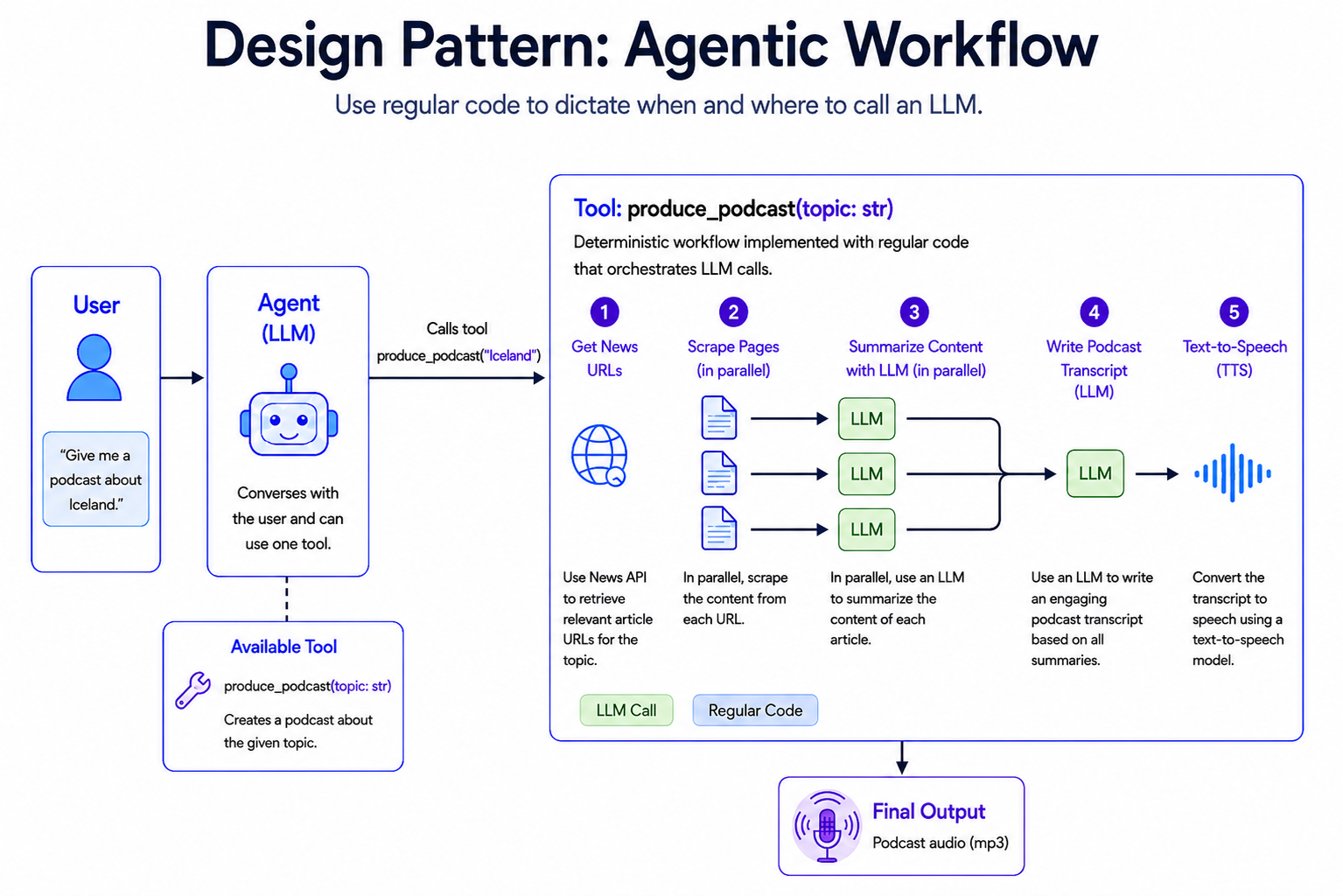
The produce_podcast function follows a deterministic workflow, and most steps are just "regular code." The first step retrieves URLs from the news API based on the LLM's chosen query (e.g. "Iceland"). We then, in parallel, scrape each web page and have an LLM summarize the content. (LLMs are pretty good at summarization!) Once we have all the summaries in hand, we have an LLM write a podcast transcript based on them (also something LLMs are good at), and finally run the transcript through a text-to-speech model.
Agentic workflows are great for apps that fulfill specific, well-defined tasks like making a news podcast. There's no need to have a single agent loop decide what steps to take to execute the plan. Instead, we lay out the steps with deterministic code. The possibility of LLM failure is now isolated to just a couple of specific areas, such as writing a poor summary or a poor transcript. But everything else is guaranteed to work as planned.
Agentic workflows aren't as effective where your app needs to handle many different tasks or arbitrary user requests whose nature can't be anticipated in advance. For this, "regular" agents may be a better choice, as the agent can use its tools in a variety of ways to fulfill different types of goals.
Whatever approach is taken, attention should always be paid to reducing nondeterminism and instruction dilution. These are the keys to reducing failures, leaving you with agents that get the job done with expertise and precision.